



















What does a Framer developer build from your designs?
A Framer developer takes a finished design and turns it into a working site: responsive layouts, reusable components, interactions, CMS templates and the settings that make it rank and load fast. The hard part isn't placing frames. It's deciding how the design behaves between the breakpoints your designer drew, and structuring it so your team can edit it for years.
This service is for in-house design teams, brand agencies and founders who already have approved Figma files. If you need the copy and design too, see our Framer agency service instead.
Deliverable | What it covers |
|---|---|
Responsive pages | Desktop, tablet and phone layouts, plus sensible behavior at the sizes in between |
Component library | Navigation, buttons, cards and sections as Framer components with variants |
Interactions | Hover, scroll and page transitions rebuilt from your prototype or motion spec |
CMS templates | Collections and detail pages for blog posts, case studies, jobs or integrations |
Code components | Custom React components for anything Framer can't do natively |
Integrations | Forms wired to your CRM, analytics, cookie consent and scheduling embeds |
SEO and launch | Titles, descriptions, social images, redirects, sitemap check and domain connection |
When do you need custom Framer code components?
You need code components when a piece of the page has logic, data or behavior that Framer's visual tools can't express. Framer runs React components inside the canvas, and with property controls your editors can still change their text and settings without touching code.
Typical code components we build on marketing sites:
- Pricing calculators that update a quote as visitors change seats, usage or plan
- ROI and savings calculators with inputs, validation and a shareable result
- Live data pulled from your API, such as a status indicator, a changelog feed or public usage numbers
- Form embeds for HubSpot or other CRMs, styled to match the design instead of the default embed
- Product demos built from real UI fragments instead of a heavy video
- Filters and search on large CMS lists, such as an integrations directory
We keep code components small and documented, because each one is something your team has to trust. If a page needs many of them, that's a sign the site may belong in code; our comparison of Framer vs Next.js covers where that line usually falls.
What we need from your Figma file
A clean Figma file makes the build faster and the result closer to the design. We work with whatever you have, but these are the things we check first, because each one becomes a decision we'd otherwise have to make for you:
- Desktop and mobile frames for every unique page and template
- Auto layout on sections, so spacing rules are explicit
- Text and color styles or variables, not one-off values
- Components for repeated elements, with hover and active states
- Real copy, or at least real lengths, for headings and cards
- A motion note or prototype for any interaction that matters
- Exported or linked assets: logos as SVG, images at full resolution
How does a Framer build run with us?
Our build process starts with an audit of your file, not with building. Gaps get flagged and agreed before they turn into rework.
File audit
We review every page and component in your Figma file and list missing states, breakpoints and assets. You get the list before the build starts.
Component inventory
We map repeated elements into a set of Framer components with variants, so a change to one card updates every card.
Page build
We build each page from those components at desktop, tablet and phone sizes, then check the in-between widths your designer didn't draw.
CMS and code
We set up collections, detail templates and any custom code components, with property controls your editors can use.
Review against the design
Your designer reviews the staging site side by side with Figma. We fix differences before anything goes live.
Launch and handoff
We connect the domain, set SEO fields and redirects, test forms and analytics, then walk your team through editing.
Because our team includes designers, gaps in the file don't stall the build. If a tablet layout is missing or a state was never designed, we propose a solution in your design language and you approve it.
Freelancer, marketplace or studio: who should build your Framer site?
The right builder depends on how complete your designs are and how much of the site has to work beyond static pages. A solo developer is fine for a small, fully specified build. A studio earns its price when the file has gaps, the CMS is involved or you need custom code.
Option | Best for | Watch out for |
|---|---|---|
Marketplace freelancer | Small, fully specified builds on a tight budget | Template reuse, no design judgment on gaps |
Experienced solo Framer developer | Clean files and a clear scope | Availability, and a single point of failure |
Designify | Builds with CMS, code components or gaps in the file | Not the cheapest option for a one-page build |
Our guide on how to hire a Framer expert covers the questions to ask any of them, including how to spot template resellers.
What does it cost to hire a Framer developer?
We don't publish a build-only price, because the cost depends on how many unique templates your file has, how much of the CMS is involved and how many code components you need. We scope it on the intro call and give you a fixed price in writing before any work starts.
For reference, our website package, with copy, custom design and build, is $8,000 for up to six pages and $500 per extra page; the card at the end of this page lists it. If you want to test the working relationship before a full build, the $1,000 trial week gives you one week of development on a real page from your file, so you can judge our build quality first. Our Framer website cost guide covers typical market ranges.
Builds we've delivered
We've delivered 60+ projects across Framer, Webflow and Next.js. A few from marketing businesses, where the site itself is the sales pitch:
- ATQ Leads: we designed and built the site for this marketing company. See the ATQ Leads project.
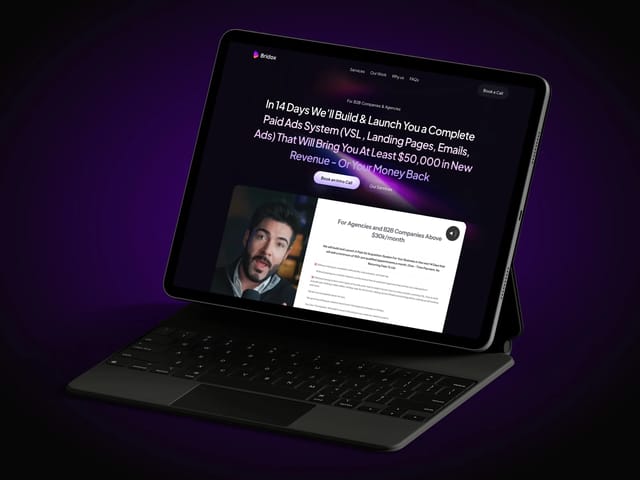
- Bridox: we designed and built the site for this marketing company. See the Bridox project.
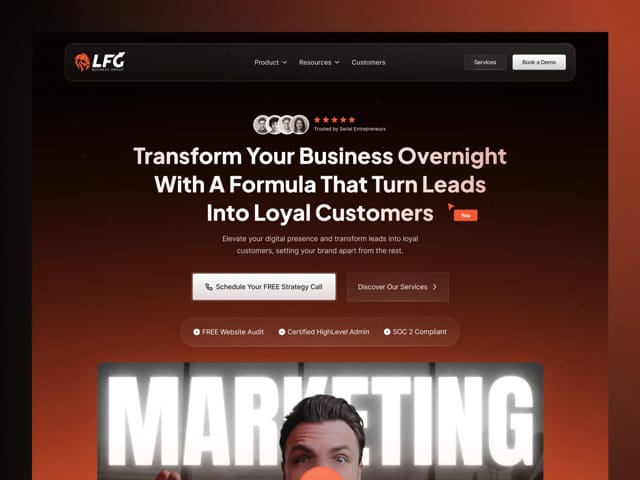
- LFG: another marketing company site we designed and built end to end. See the LFG project.
What happens on the intro call?
On the free 30-minute call we look at your Figma file together, ask what needs to be live and when, and flag anything that will need a decision. If you share the file beforehand, we can bring a rough component and template count. You'll leave with a clear next step, and a written fixed price follows if it's a fit.
Moving an existing site into Framer?
If you're rebuilding a Webflow, WordPress or coded site in Framer, the build is a manual rebuild: no tool converts a site across cleanly. Migration work is scoped on the intro call, and we include redirects and SEO checks in any migration we take on. Our Webflow to Framer migration guide explains the process step by step.